Beacon Frames Explained: How Wi-Fi Networks Advertise, Synchronize, and Serve Clients
Every Wi-Fi network starts by making itself known. Before a phone, laptop, or IoT device can join an access point (AP), it needs enough information to discover the network and decide whether it is compatible. That information arrives in a small but essential 802.11 management packet: the beacon frame. Beacon frames help devices find nearby Wi-Fi networks, understand their capabilities and security settings, keep time with the AP, and support power-saving behavior. They are routine background traffic, but their configuration can influence roaming, battery life, airtime use, and the user experience on a busy wireless LAN.
What Is a Beacon Frame?
A beacon frame is a broadcast 802.11 management frame transmitted periodically by an AP to advertise a wireless network, also called a basic service set (BSS). It is sent to every device within radio range, so a client can discover a network without already being associated with it.
In practical terms, a beacon is the network’s regular “I’m here, and here is how I operate” announcement. Beacons carry configuration details such as the SSID, supported rates, and security configuration.
Beacon frames are not user data. They belong to the management plane—the collection of 802.11 frames that helps a client discover, authenticate with, associate to, and remain synchronized with a Wi-Fi network.
What Information Does a Wi-Fi Beacon Frame Contain?
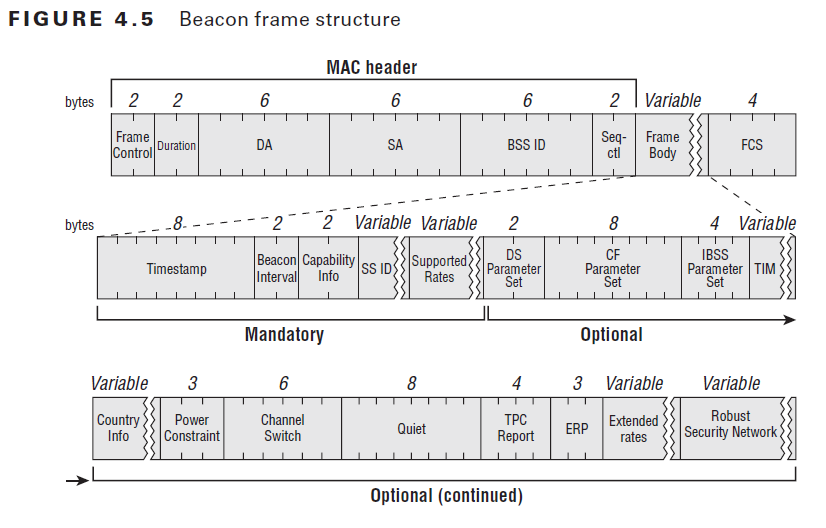
The exact contents depend on the Wi-Fi generation, AP configuration, and enabled features. However, a beacon commonly includes fixed fields and information elements (IEs) that describe the BSS.
Important beacon-frame contents include:
- SSID: The network name shown to users, unless the network is configured not to include it in the beacon.
- BSSID: The radio MAC address that identifies the specific BSS.
- Timestamp: Helps stations synchronize their timing with the AP.
- Beacon interval: States the time between target beacon transmissions.
- Capability information: Indicates supported network behaviors and options.
- Supported rates and PHY capabilities: Helps devices determine whether they can communicate effectively with the AP.
- Channel and regulatory details: Identifies the operating channel and, where relevant, country or operating-class information.
- Security information: The Robust Security Network (RSN) information element can advertise security capabilities such as WPA2 or WPA3 support.
- TIM/DTIM information: Tells power-saving clients when the AP has buffered traffic available for them.
- Vendor- or standard-specific IEs: May advertise roaming, QoS, Wi-Fi 6/6E/7 capabilities, multiple BSSIDs, or other features.
This collection of information is why beacons are central to wireless discovery. A client uses them to build its view of nearby networks during a passive scan, then decides whether to attempt a connection.
How Beacon Frames Work During Wi-Fi Discovery
When a client scans for Wi-Fi, it can listen for beacon frames on each channel. This is called passive scanning. Because beacons are broadcast regularly, the client can learn about available networks without sending a request first.
Clients can also use active scanning by sending probe requests and receiving probe responses. Probe responses and beacons share much of the same descriptive information, but they serve different moments in the discovery process:
| Frame | Who sends it? | Main purpose |
|---|---|---|
| Beacon frame | AP | Periodically advertises the BSS to all nearby clients |
| Probe request | Client | Asks whether a network or AP is present |
| Probe response | AP | Replies to a client’s probe request with network details |
Once a client identifies a suitable network, it proceeds through authentication and association. Beacons continue after association, helping the client remain aware of network timing and changes to advertised capabilities.
Beacon Interval: Why the Default Is Usually About 100 ms
The beacon interval is the scheduled time between beacon transmissions. A common default is 100 time units (TUs), which is approximately 102.4 milliseconds because one TU equals 1.024 ms. Many AP interfaces present this value simply as 100 ms, or about 10 beacons per second.
It can be tempting to change this setting, but it is rarely a first-line performance fix.
A Shorter Beacon Interval
A shorter interval may let scanning clients receive AP information sooner and can make some network changes visible more quickly. The trade-off is more management traffic and more airtime consumed by every advertised BSS.
A Longer Beacon Interval
A longer interval reduces beacon overhead, which may sound attractive in a dense environment. However, it can increase discovery latency and may affect the behavior of clients that expect conventional settings. A poorly configured beacon interval can prevent some clients from connecting.
For most office, home, and general-purpose enterprise WLANs, retain the vendor default unless a site survey, packet capture, and device requirements point to a different setting. The bigger design win is often reducing unnecessary SSIDs, since each advertised BSS adds management overhead.
DTIM: The Power-Saving Role of Beacon Frames
The Delivery Traffic Indication Message (DTIM) is included in selected beacons. It tells clients in power-save mode that broadcast or multicast traffic is buffered at the AP and ready to be delivered.
The DTIM period is expressed in beacons. For example, a 100 ms beacon interval with a DTIM period of 2 means the AP sends a DTIM-bearing beacon roughly every 200 ms. Lower DTIM values can reduce delivery delay for buffered broadcast or multicast traffic, while higher values can let sleeping clients wake less often and potentially conserve battery.
There is no universal “best” DTIM value. Real-time use cases, voice clients, IoT devices, and mobile battery goals may pull the setting in different directions. Test with the actual client mix before standardizing a change.
Beacon Frames and Wi-Fi Security
Beacons must be readable to devices that have not yet joined the network, so they advertise—not conceal—basic network characteristics. The security information in a beacon helps a client recognize whether a WLAN uses an expected security mode before association.
That visibility also means a beacon alone is not proof that a network is trustworthy. An attacker can attempt to imitate an SSID or create a rogue AP. Strong authentication, WPA3 where supported, certificate validation for enterprise Wi-Fi, and wireless intrusion monitoring provide more meaningful protections than trying to hide the SSID.
Protected Management Frames (PMF, defined by IEEE 802.11w) improve protection for certain management exchanges, notably deauthentication and disassociation traffic after a client has connected. They do not turn the initial broadcast discovery process into a private channel. Treat beacon monitoring as one layer of wireless security visibility, not as a complete security control.
How to Troubleshoot Beacon-Frame Problems
Beacon analysis is useful when users report that a network is missing, unreliable, slow to appear, or behaves differently on certain devices. Capture traffic in monitor mode with a supported Wi-Fi adapter, then inspect beacon frames in a protocol analyzer.
Start with these checks:
- Confirm the BSSID, SSID, channel, and radio band. Make sure the AP is advertising the network on the expected radio and channel.
- Review the beacon interval and DTIM period. Look for inconsistent settings across APs that serve the same SSID.
- Inspect advertised security. Check the RSN information element to confirm the intended WPA2/WPA3 and PMF capabilities are being announced.
- Compare supported rates and capabilities. Legacy rates or unexpected capability IEs can increase airtime use or create compatibility issues.
- Count SSIDs per radio. Too many BSSIDs can create significant management overhead, especially at lower basic rates.
- Check signal quality and channel contention. A correct beacon on an overloaded or noisy channel may still be difficult for clients to receive reliably.
- Compare a healthy AP with a troubled AP. A side-by-side beacon capture often exposes a wrong channel, security policy, or capability advertisement.
Wireshark recognizes beacon-specific fields such as the beacon interval and DTIM values, making it a practical tool for this investigation.
Beacon Frames in Wi-Fi 6E and Newer Networks
Beacon frames remain important in Wi-Fi 6E and newer deployments, but efficiency features reduce unnecessary management overhead. In the 6 GHz band, for example, implementations can advertise multiple BSSIDs in a single beacon rather than transmitting a separate full beacon for every SSID.
The principle remains the same: Wi-Fi clients need concise, reliable information to discover and evaluate a network. Modern standards refine how that information is advertised so dense networks can use the air more efficiently.
Conclusion
Beacon frames are the foundation of Wi-Fi discovery and synchronization. They announce that a network exists, advertise the settings clients need to evaluate it, and support power-saving clients through TIM and DTIM information. Understanding them gives network teams a practical way to diagnose discovery, roaming, compatibility, and airtime issues—without treating a routine AP setting as a shortcut for broader WLAN design.