Comet: Everything You Need to Know
Modern web applications demand instant updates without requiring users to refresh their browsers. Whether it’s a live chat application, stock market dashboard, online gaming platform, or collaborative editing tool, users expect information to appear in real time. Before technologies like WebSockets and Server-Sent Events (SSE) became mainstream, developers relied on Comet to achieve near real-time communication between web servers and browsers.
What Is Comet?
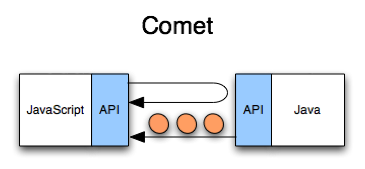
Comet is a web application model that enables a server to send data to a client asynchronously over HTTP without requiring the client to repeatedly request updates. Instead of the browser continuously asking the server whether new data exists, Comet keeps an HTTP connection open until the server has new information to deliver. This creates the appearance of a persistent connection while still using standard HTTP.
Although Comet is often referred to as a technology, it is actually a collection of techniques designed to simulate server push before true bidirectional communication became available.
Why Was Comet Created?
Traditional HTTP follows a request-response model:
- Browser sends request
- Server processes request
- Server returns response
- Connection closes
This model works well for static content but is inefficient for applications requiring instant updates.
Examples include:
- Live messaging
- Online auctions
- Financial trading platforms
- Sports score updates
- Social media notifications
Refreshing the page every few seconds wastes:
- Bandwidth
- CPU resources
- Network capacity
- User experience
Comet solved this limitation.
How Comet Works
The key idea behind Comet is simple:
- The browser makes an HTTP request.
- Instead of immediately responding, the server keeps the connection open.
- When new information becomes available, the server sends the response.
- The browser immediately opens another connection.
- The cycle repeats continuously.
Client -----------------------> Server

HTTP Request

(Server waits...)

(Server has data)

Server -----------------------> Client

HTTP Response

Client immediately sends another request

Repeat
This creates a nearly continuous stream of updates.
Components of a Comet System
Client
Responsible for:
- Opening HTTP connection
- Receiving updates
- Reconnecting automatically
- Updating the UI
Web Server
Maintains long-lived HTTP requests.
Must efficiently manage:
- Thousands of connections
- Connection timeouts
- Memory usage
Application Server
Handles:
- Business logic
- Authentication
- Event generation
- Data processing
Data Source
Events may originate from:
- Databases
- Message queues
- APIs
- IoT devices
- Monitoring systems
Advantages of Comet
- Real-Time Updates – Users receive information immediately.
- Reduced Polling Overhead – Instead of polling every second. The browser waits until data exists. This significantly reduces unnecessary requests.
- Better User Experience – Applications feel faster and more responsive. Examples include: Gmail (early versions), Facebook notifications, live dashboards, chat systems…
- Browser Compatibility – Comet worked before WebSockets, HTTP/2 server push, and Server-Sent Events, making it compatible with older browsers.
Disadvantages of Comet
- High Server Resource Usage – Each client keeps a connection open. Thousands of users require thousands of simultaneous connections.
- Scalability Challenges – Traditional web servers were optimized for short-lived requests. Keeping connections open increases memory consumption, file descriptors, and CPU scheduling.
- Proxy Issues – Some corporate proxies close idle connections. This interrupts Comet communication.
- Increased Complexity – Developers must implement: automatic reconnects, timeout handling, error recovery, session management…
Common Use Cases
- Live Chat – Messages appear instantly.
- Online Gaming – Players receive updates in real time.
- Stock Market Dashboards – Prices update continuously.
- Sports Score Applications – Scores refresh immediately.
- Social Media Notifications – New likes, comments, and messages arrive without refreshing the page.
- Collaborative Editing – Users see edits as they happen.
- Monitoring Dashboards – Useful for: server monitoring, cloud monitoring, network operations centers, security dashboards…
When Should You Use Comet?
Comet may still be suitable when:
- Supporting legacy browsers
- Working in environments where WebSockets are unavailable
- Maintaining existing enterprise systems
- Using infrastructure optimized for HTTP
For most new projects, consider:
- Server-Sent Events for one-way updates
- WebSockets for two-way communication
- HTTP/2 or HTTP/3 for modern transport efficiency
Best Practices
To build reliable Comet applications:
- Use long polling instead of frequent short polling.
- Implement automatic reconnection with exponential backoff.
- Configure appropriate server timeout values.
- Compress responses with Gzip or Brotli where appropriate.
- Send lightweight payloads, preferably in JSON format.
- Authenticate requests using secure session management or tokens.
- Monitor connection counts and server resource utilization.
- Load balance requests across multiple servers when supporting many concurrent users.
Security Considerations
Because Comet connections remain open for extended periods, pay attention to:
- Authentication: Ensure only authorized users receive updates.
- Encryption: Use HTTPS/TLS to protect data in transit.
- Cross-Site Request Forgery (CSRF): Validate requests where applicable.
- Rate Limiting: Prevent abuse through excessive connection attempts.
- Connection Timeouts: Detect and close stale or inactive connections.
- Input Validation: Sanitize all data before processing or displaying it.
Future of Comet
Comet played a significant role in the evolution of real-time web communication. While it is no longer the preferred choice for new applications, its concepts influenced modern standards such as:
- WebSockets
- Server-Sent Events (SSE)
- HTTP/2
- HTTP/3
- Real-time messaging frameworks
Many legacy enterprise systems continue to use Comet, but modern web development generally favors standardized technologies that offer better scalability, lower latency, and simpler APIs.
Conclusion
Comet was a groundbreaking approach that brought real-time capabilities to the web before native server-push technologies existed. By keeping HTTP connections open through techniques like long polling and HTTP streaming, it enabled applications such as live chat, notifications, stock tickers, and monitoring dashboards to deliver timely updates without constant page refreshes.
Although WebSockets and Server-Sent Events have largely superseded Comet in modern development, understanding how Comet works remains valuable. It provides historical context for today’s real-time web technologies, helps developers maintain legacy systems, and illustrates the evolution of efficient client-server communication.