Directed Acyclic Graph (DAG): Definition, Uses, and Examples
A directed acyclic graph, commonly called a DAG, is a way to represent relationships where connections move in one direction and never form a loop. DAGs are widely used in computer science because they make dependencies clear: one step can depend on another, but nothing can eventually depend on itself. From build systems and data pipelines to Git repositories and machine-learning workflows, DAGs help software organize complex processes reliably.
What Is a Directed Acyclic Graph?
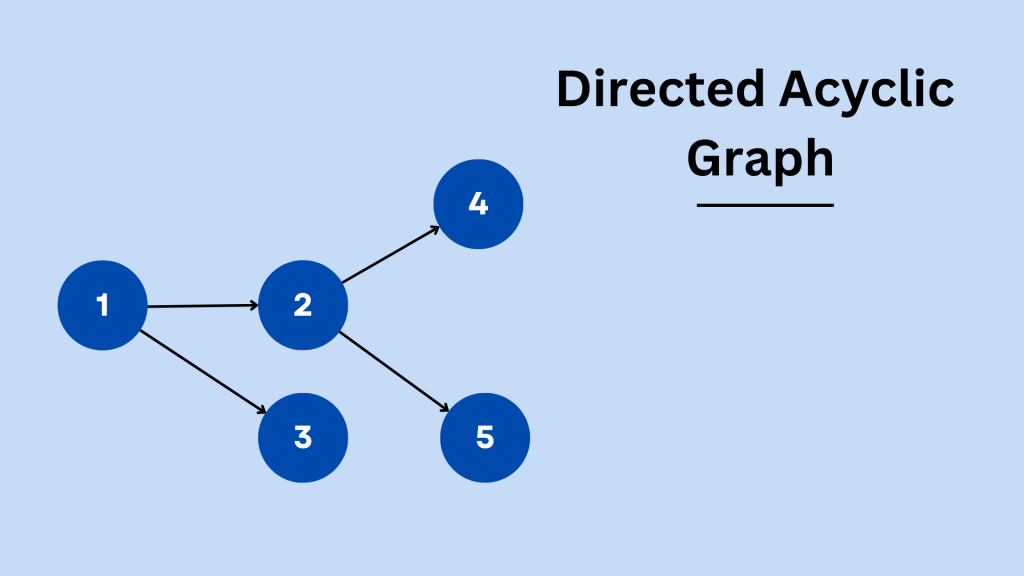
A directed acyclic graph consists of:
- Nodes (vertices): the items being represented, such as tasks, files, or data-processing steps.
- Directed edges: arrows that show a one-way relationship between nodes.
- No cycles: following the arrows can never bring you back to the node where you started.
For example:
Gather data → Clean data → Train model → Deploy modelThis is a DAG because each stage moves forward. Adding an arrow from “Deploy model” back to “Gather data” would create a cycle, so the graph would no longer be acyclic.
Why “Directed” and “Acyclic” Matter
The word directed means every connection has a clear direction. If Task B depends on Task A, the graph can show:
Task A → Task BThe word acyclic means the graph has no circular dependencies. A problematic cycle might look like this:
Task A → Task B → Task C → Task AIn this scenario, each task waits for another task in the same loop. DAGs prevent this issue by requiring a valid forward-only path.
How Does a DAG Work?
A directed acyclic graph models dependency relationships. Each node can have:
- Parent nodes: items that must happen first.
- Child nodes: items that happen afterward.
- Root nodes: starting points with no prerequisites.
- Leaf nodes: ending points with no outgoing connections.
Because there are no cycles, a DAG can be arranged in a valid execution order. This is known as a topological sort.
For example, if a website deployment requires code review before release, a topological ordering could be:
Write code → Review code → Run tests → DeployA system can execute independent tasks in parallel while still respecting the required order.
Common Uses of Directed Acyclic Graphs
1. Task Scheduling and Workflow Automation
Workflow tools use DAGs to coordinate tasks that depend on one another. For example, an analytics workflow may need to:
- Import daily data.
- Validate it.
- Transform it.
- Generate reports.
- Notify stakeholders.
Tools such as Apache Airflow use DAGs to define these workflows, schedule them, and identify exactly where a failure occurred.
2. Data Pipelines
Modern data engineering relies heavily on DAGs. A single dataset may pass through many stages before it reaches a dashboard or machine-learning model.
A DAG helps teams understand:
- Which upstream sources affect a report.
- Which jobs can run at the same time.
- What must be rerun after a data-quality issue.
- Where a pipeline failed.
3. Git Version Control
Git history is often described as a DAG. Each commit points to one or more earlier commits, creating a record of how the project evolved.
Most commits have one parent, while merge commits can have multiple parents. Because a commit cannot become its own ancestor, Git’s commit history remains acyclic.
4. Build Systems
Build tools use DAGs to determine the order in which files should be compiled or generated. If an application depends on several libraries, the system builds those dependencies first.
This approach improves efficiency because unrelated components can often be built simultaneously.
5. Machine Learning and AI
Machine-learning workflows typically involve dependent stages, including data preparation, feature engineering, model training, evaluation, and deployment.
Representing the workflow as a DAG makes the process reproducible and easier to monitor. It also prevents downstream processes from running before the data they require is available.
DAG vs. Tree: What Is the Difference?
A tree is a special type of graph with a strict hierarchy: each child usually has one parent, except for the root node.
A DAG is more flexible. A node can have multiple parents. For example, a final report might depend on both sales data and marketing data:
Sales data ──────┐
                 ├→ Final report
Marketing data ─┘
This structure is not a simple tree, but it is a DAG because the relationships are directed and no path loops back.
Benefits of Using a DAG
Directed acyclic graphs offer several practical advantages:
- Clear dependencies: Teams can see what must happen before a process can continue.
- Parallel execution: Independent tasks can run at the same time.
- Easier debugging: Failures can be traced to a specific node or upstream dependency.
- Better reliability: Cycles and impossible dependency chains can be detected early.
- Improved scalability: Large workflows can be broken into manageable components.
How to Detect a Cycle in a Graph
Cycle detection is essential when building or validating a DAG. A common method uses a depth-first search (DFS):
- Start from a node and follow its outgoing edges.
- Mark each currently explored node.
- If the search reaches a node that is already being explored, a cycle exists.
Another approach is to attempt a topological sort. If every node cannot be placed into a valid order, the graph contains at least one cycle.
Simple Directed Acyclic Graph Example
Imagine publishing an article:
Research → Draft → Edit → Publish
              ↓
         Create images
              ↓
           Publish
The “Edit” and “Create images” tasks can happen after the draft. However, publishing must wait until both are complete. This is a practical DAG because every dependency moves forward and no task loops back.
Final Thoughts
A directed acyclic graph is one of the most useful structures for modeling dependencies. By enforcing one-way relationships without loops, DAGs make it possible to schedule tasks, manage versions, build software, and process data with confidence. Whether you are designing a data pipeline, automating workflows, or working with Git, understanding DAGs gives you a practical foundation for handling systems where order matters.