Path Vector Routing Protocol: A Comprehensive Guide to Path-Based Routing
Path Vector Routing Protocol is a routing method used in large-scale networks, particularly on the Internet, to determine the best path for data transmission between autonomous systems (AS). Unlike distance vector and link-state routing protocols, path vector routing focuses on the entire route path, helping prevent routing loops and improving network stability. In this article, we’ll explore what a path vector routing protocol is, how it works, its advantages, limitations, and its most common implementation: the Border Gateway Protocol (BGP).
What Is a Path Vector Routing Protocol?
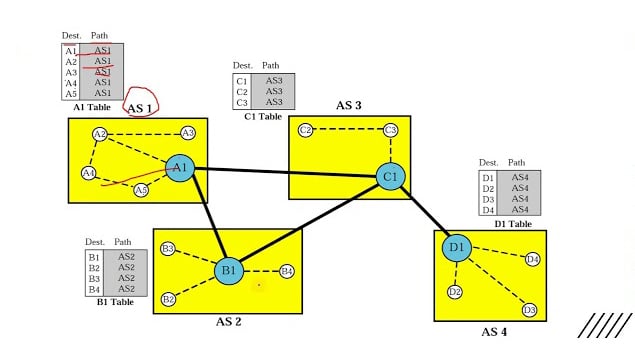
A Path Vector Routing Protocol is a routing algorithm that maintains the complete path information to a destination network. Instead of only storing the distance or cost to a destination, routers record the sequence of autonomous systems through which a route passes.
This approach enables routers to make informed routing decisions and avoid routing loops by examining the path history.
Key Characteristics
- Stores the entire routing path
- Operates between autonomous systems (AS)
- Prevents routing loops automatically
- Scales efficiently for large networks
- Commonly used in internet routing
How Does It Work?
In a path vector routing environment, routers exchange routing information that includes:
- Destination network
- Next-hop router
- Autonomous System (AS) path
- Routing policies
- Network attributes
When a router receives a route advertisement:
- It checks the AS path.
- If its own AS number appears in the path, the route is rejected to avoid loops.
- The router evaluates routing policies and attributes.
- The best route is selected and added to the routing table.
- The updated path is advertised to neighboring routers.
Example
Suppose a route travels through:
- AS100 → AS200 → AS300 → Destination
The routing update contains the AS path:
AS100 AS200 AS300If AS200 receives an update containing its own AS number, it immediately recognizes a routing loop and discards the route.
Components of a Path Vector Routing Protocol
1. Autonomous System (AS)
An autonomous system is a collection of IP networks managed under a single administrative domain.
Examples include:
- Internet Service Providers (ISPs)
- Large enterprises
- Cloud providers
- Educational institutions
2. AS Path
The AS path lists all autonomous systems that a routing update has traversed.
Benefits include:
- Loop prevention
- Policy-based routing
- Route selection
3. Routing Attributes
Path vector protocols use various attributes to determine the best route.
Common attributes include:
| Attribute | Purpose |
|---|---|
| AS Path | Indicates route length and history |
| Local Preference | Determines preferred outbound path |
| MED (Multi-Exit Discriminator) | Suggests preferred entry point |
| Next Hop | Specifies the next router |
| Origin | Identifies the route source |
Border Gateway Protocol (BGP): The Most Popular Path Vector Routing Protocol
The primary implementation of path vector routing is the Border Gateway Protocol.
BGP is responsible for routing traffic across the global internet and connecting thousands of autonomous systems worldwide.
Why BGP Uses Path Vector Routing
The internet consists of numerous independent networks. Traditional routing protocols struggle at this scale.
Path vector routing allows BGP to:
- Handle millions of routes
- Apply routing policies
- Prevent routing loops
- Support internet-scale growth
Path Vector Routing vs Distance Vector Routing
| Feature | Path Vector | Distance Vector |
|---|---|---|
| Routing Information | Complete path | Distance and direction |
| Loop Prevention | Built-in via AS path | Requires additional mechanisms |
| Scalability | Excellent | Moderate |
| Complexity | Higher | Lower |
| Internet Usage | Yes | Rarely |
Distance Vector Example
Protocols such as the Routing Information Protocol only know:
- Destination
- Number of hops
They do not know the complete route history.
Path Vector Example
Protocols like BGP know:
- Destination
- Full AS path
- Routing policies
- Additional route attributes
Path Vector Routing vs Link-State Routing
| Feature | Path Vector | Link-State |
|---|---|---|
| Routing Scope | Between autonomous systems | Within an autonomous system |
| Network View | Path information | Complete topology |
| Scalability | Very high | High |
| Typical Protocol | BGP | Open Shortest Path First |
| Route Calculation | Policy-based | Shortest-path algorithm |
Link-state protocols build a detailed map of the network, while path vector protocols focus on inter-domain routing.
Advantages of Path Vector Routing Protocols
1. Effective Loop Prevention
AS path information allows routers to detect loops instantly.
2. High Scalability
Path vector routing can support the vast size of the Internet.
3. Policy-Based Routing
Administrators can define routing policies based on:
- Business agreements
- Security requirements
- Traffic engineering
4. Flexibility
Multiple route attributes provide fine-grained control over traffic flow.
5. Stability
Updates are only sent when topology changes occur, reducing bandwidth consumption.
Disadvantages of Path Vector Routing Protocols
- Configuration Complexity – Protocols such as BGP require significant expertise to configure correctly.
- Slower Convergence – Route updates may take longer to propagate compared to some internal routing protocols.
- Resource Requirements – Large routing tables consume: CPU resources, memory, and storage.
- Policy Management Challenges – Complex routing policies can become difficult to manage in large environments.
Real-World Applications of Path Vector Routing
- Internet Service Providers – ISPs exchange routes using BGP to provide global internet connectivity.
- Data Centers – Large cloud providers use path vector routing to manage traffic between regions.
- Enterprise Networks – Organizations with multiple internet connections use BGP for redundancy and traffic optimization.
- Content Delivery Networks (CDNs) – CDNs leverage path vector routing to deliver content efficiently from geographically distributed servers.
Security Considerations
While path vector routing is powerful, it can face challenges such as:
- Route hijacking
- Route leaks
- Misconfigurations
- Denial-of-service attacks
To enhance security, organizations often implement:
- Route filtering
- Prefix validation
- RPKI (Resource Public Key Infrastructure)
- BGP monitoring tools
Best Practices for Implementing Path Vector Routing
- Filter incoming and outgoing routes.
- Validate AS path information.
- Use route aggregation where possible.
- Monitor routing updates continuously.
- Implement routing security measures such as RPKI.
- Document routing policies clearly.
- Test configuration changes before deployment.
Future of Path Vector Routing
As internet traffic continues to grow, path vector routing remains essential for global connectivity. Emerging technologies such as:
- Software-Defined Networking (SDN)
- Segment Routing
- Enhanced BGP security mechanisms
- Automated network orchestration
are improving the efficiency and reliability of path vector-based routing systems.
Conclusion
A Path Vector Routing Protocol is a critical routing mechanism that enables communication between autonomous systems across large-scale networks. By maintaining complete path information, it provides excellent scalability, loop prevention, and policy-based routing capabilities.
The most prominent example, BGP, serves as the backbone of the modern internet, connecting networks worldwide and ensuring reliable data delivery. Understanding path vector routing is essential for network engineers, cybersecurity professionals, and IT administrators working with enterprise and internet-scale infrastructures.