What Is Hybrid Backup?
What Is Hybrid Backup?
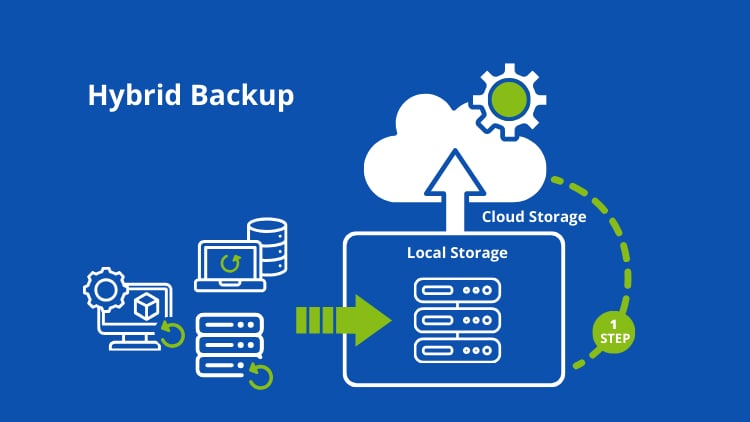
Hybrid backup is a data protection strategy that stores copies of your data both locally (on-premises storage) and off-site (cloud storage). This dual-layer approach ensures faster recovery times while maintaining secure, remote copies in case of disasters.
Key Components:
- Local Backup: Stored on devices like NAS, external drives, or on-prem servers
- Cloud Backup: Stored in remote data centers via cloud providers
- Backup Management Software: Coordinates and automates backup processes
How Hybrid Backup Works
Hybrid backup systems typically follow a simple yet effective workflow:
- Data is backed up locally for quick access and fast recovery
- A copy is replicated to the cloud for off-site protection
- Automation tools manage scheduling, synchronization, and retention policies
This ensures that even if local storage fails, your data remains safe in the cloud.
Some Benefits
- Faster Data Recovery – Local backups allow near-instant recovery, minimizing downtime during outages.
- Enhanced Data Security – Cloud copies protect against physical disasters like fires, floods, or theft.
- Cost Efficiency – You can reduce cloud storage costs by prioritizing local backups for frequently accessed data.
- Scalability – Cloud storage can grow with your needs without requiring additional hardware investment.
- Redundancy & Reliability – Multiple backup locations significantly reduce the risk of permanent data loss.
Hybrid Backup vs Cloud-Only vs Local-Only
| Feature | Hybrid Backup | Cloud Backup | Local Backup |
|---|---|---|---|
| Recovery Speed | Fast | Moderate | Fast |
| Disaster Protection | High | High | Low |
| Cost | Balanced | Ongoing | One-time |
| Scalability | High | High | Limited |
Conclusion: Hybrid backup offers the most balanced approach across all factors.
Common Use Cases
- Small and Medium Businesses (SMBs) – Protect critical business data while maintaining quick recovery capabilities.
- Enterprises – Ensure compliance and disaster recovery across distributed environments.
- Remote Teams – Safeguard data across multiple locations with centralized cloud backups.
- Ransomware Protection – Keep immutable cloud copies safe from encryption attacks.
Best Practices for Hybrid Backup
1. Follow the 3-2-1 Rule
- 3 copies of data
- 2 different storage types
- 1 offsite copy
Hybrid backup naturally supports this strategy.
2. Automate Backup Processes
Use scheduling tools to ensure consistent and error-free backups.
3. Encrypt Your Data
Apply encryption both in transit and at rest to enhance security.
4. Test Your Backups Regularly
Perform routine recovery tests to ensure data integrity and availability.
5. Use Incremental Backups
Reduce storage usage and improve efficiency by only backing up changed data.
Challenges of Hybrid Backup
While powerful, a hybrid backup also comes with some challenges:
- Complex setup and management
- Bandwidth limitations for cloud sync
- Potential for higher upfront costs
- Need for monitoring and maintenance
However, modern backup solutions are increasingly simplifying these processes.
Choosing the Right Hybrid Backup Solution
When selecting a hybrid backup system, consider:
- Storage capacity (local + cloud)
- Backup speed and recovery time objectives (RTO)
- Security features (encryption, immutability)
- Compatibility with your existing infrastructure
- Cost and scalability
Popular solutions often include integrated platforms that handle both local and cloud backups seamlessly.
Future of Hybrid Backup
As cyber threats evolve and data volumes grow, hybrid backup is becoming the industry standard. Emerging trends include:
- AI-driven backup optimization
- Integration with disaster recovery as a service (DRaaS)
- Immutable backups for ransomware protection
- Edge computing integration
Conclusion
Hybrid backup is a powerful, flexible, and secure data protection strategy that combines the speed of local backups with the resilience of cloud storage. Whether you’re a small business or a large enterprise, adopting a hybrid backup approach can significantly improve your data security posture. By implementing best practices and choosing the right tools, you can ensure your data is always protected, accessible, and ready for recovery – no matter what happens.