TCP Segment Header Explained: Fields, Flags, and Examples
The TCP segment header is the control information that makes Transmission Control Protocol (TCP) reliable. Before a TCP segment carries application data—such as a web request, an email message, or a file transfer—it carries a header that tells endpoints where the data belongs, whether it arrived correctly, and what should happen next. Understanding the TCP header is useful for network troubleshooting, packet analysis, cybersecurity, and software development. This guide breaks down the TCP segment header format, explains every field and flag, and shows how to read it in a real-world capture.
What is a TCP segment header?
A TCP segment consists of two parts:
- Header: Control information used by TCP.
- Payload (data): The bytes sent by the application.
The TCP header sits inside an IP packet. IP delivers the packet between hosts; TCP uses its header to deliver a reliable, ordered byte stream between applications running on those hosts.
The fixed portion of a TCP header is 20 bytes. Optional TCP options can extend it to 60 bytes. The authoritative TCP specification describes the header length in 32-bit words, so the header is always a multiple of four bytes.
TCP segment header format
  0                   1                   2                   3
  0 1 2 3 4 5 6 7 8 9 0 1 2 3 4 5 6 7 8 9 0 1 2 3 4 5 6 7 8 9 0 1
 +-------------------------------+-------------------------------+
 |          Source Port          |       Destination Port        |
 +-------------------------------+-------------------------------+
 |                        Sequence Number                        |
 +-------------------------------+-------------------------------+
 |                     Acknowledgment Number                     |
 +-------------------------------+-------------------------------+
 | Data | Res. |C|E|U|A|P|R|S|F|             Window             |
 |Offset|      |W|C|R|C|S|S|Y|I|                                |
 +-------------------------------+-------------------------------+
 |           Checksum            |         Urgent Pointer        |
 +-------------------------------+-------------------------------+
 |                    Options and Padding (optional)             |
 +-------------------------------+-------------------------------+
 |                         Application Data                      |
 +---------------------------------------------------------------+
TCP header fields explained
1. Source port (16 bits)
The source port identifies the sending application. A client browser might choose a temporary source port, while a server commonly uses a well-known destination port such as 443 for HTTPS. TCP uses the source and destination port pair with the IP addresses to distinguish one connection from another.
2. Destination port (16 bits)
The destination port identifies the application or service that should receive the segment on the destination host. For example, a TCP segment headed to a web server may use destination port 80 (HTTP) or 443 (HTTPS).
3. Sequence number (32 bits)
The sequence number labels the first data byte in the segment. TCP numbers bytes, not individual packets. This lets the receiver reorder out-of-order segments and detect missing data.
During connection setup, a segment with the SYN flag uses this field to carry the initial sequence number. After the connection is established, sequence numbers advance by the number of payload bytes sent. SYN and FIN each also consume one sequence-number position, even when they carry no application data.
4. Acknowledgment number (32 bits)
When the ACK flag is set, the acknowledgment number states the next byte the sender expects to receive. In other words, it cumulatively confirms receipt of all preceding bytes in the stream.
For example, an acknowledgment number of 5001 normally means: “I have received every byte through 5000; send byte 5001 next.” This cumulative behavior is a key part of TCP reliability.
5. Data offset (4 bits)
The data offset tells the receiver where the TCP payload starts. Its value is measured in 32-bit words rather than bytes.
- A value of
5means a 20-byte header with no options. - A value of
15means a 60-byte header, the maximum TCP header size.
This field matters whenever TCP options are present. A packet analyzer uses it to separate header bytes from application data correctly.
6. Reserved bits (4 bits)
The reserved bits are set aside for future TCP features. Senders must set them to zero unless a defined extension assigns them a meaning. In normal packet captures, these bits are typically zero.
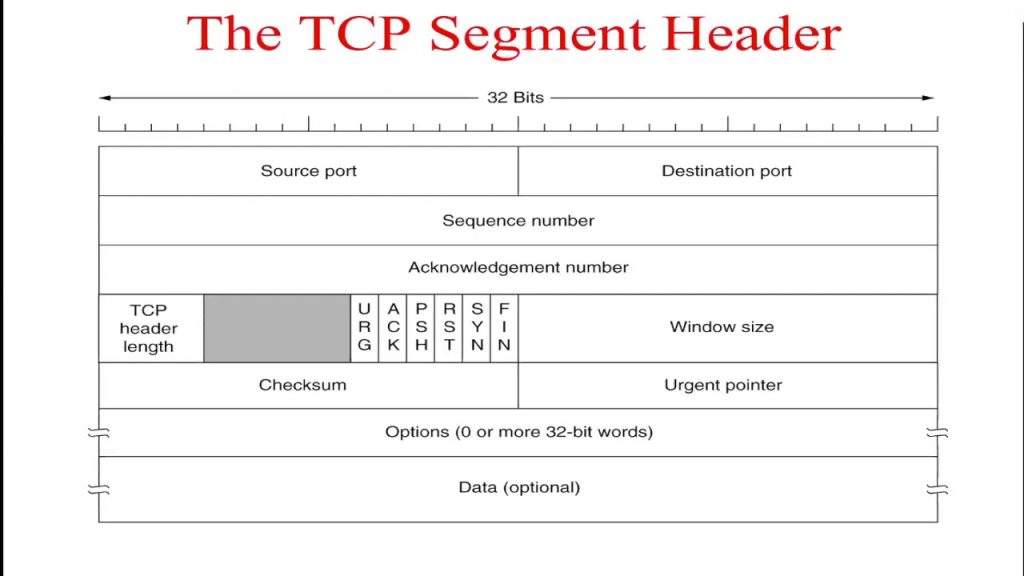
7. TCP flags (control bits)
TCP flags, also called control bits, signal connection state and special handling. Modern TCP defines eight assigned flags:
| Flag | Full name | What it indicates |
|---|---|---|
| CWR | Congestion Window Reduced | The sender has responded to congestion feedback. |
| ECE | ECN-Echo | Signals Explicit Congestion Notification feedback or capability during setup. |
| URG | Urgent | The urgent pointer field is significant. |
| ACK | Acknowledgment | The acknowledgment number is valid. |
| PSH | Push | Requests prompt delivery of received data to the application. |
| RST | Reset | Aborts or refuses a connection. |
| SYN | Synchronize | Starts a connection and synchronizes initial sequence numbers. |
| FIN | Finish | Signals that the sender has no more data to send. |
The most familiar TCP flag sequence is the three-way handshake:
Client  → Server: SYN
Client  ← Server: SYN, ACK
Client  → Server: ACK
Connection termination often uses FIN and ACK segments. An RST segment is different: it immediately resets the connection rather than closing it gracefully.
8. Window size (16 bits)
The window size advertises how much data the sender of the segment is currently willing to receive, beginning at the acknowledged byte. It is the receiver’s flow-control signal.
A small or zero window tells the peer to slow down or pause sending. The 16-bit field can be scaled by the TCP Window Scale option, which allows modern connections to use receive windows larger than 65,535 bytes. This is flow control, not the same thing as congestion control: flow control protects the receiving endpoint, while congestion control reacts to network conditions.
9. Checksum (16 bits)
The TCP checksum helps detect accidental corruption in transit. It covers the TCP header, TCP payload, and a pseudo-header derived from the enclosing IP packet. The pseudo-header binds the checksum to the source and destination IP addresses and protocol information.
The TCP checksum is mandatory: the sender generates it, and the receiver verifies it. If the integrity check fails, the receiving TCP implementation discards the segment rather than delivering corrupted data to the application.
10. Urgent pointer (16 bits)
The urgent pointer is meaningful only when the URG flag is set. It is a positive offset from the segment’s sequence number and identifies the sequence number immediately following the urgent data.
Despite its name, it does not make traffic travel faster through the network. The feature is uncommon in modern applications and can be handled differently across systems, so it is rarely central to everyday TCP analysis.
11. TCP options and padding (variable length)
TCP options extend the protocol without changing its fixed header. They occupy the space after the urgent pointer and before the payload. Padding aligns the overall header to a 32-bit boundary.
Common TCP options include:
| Option | Purpose |
| Maximum Segment Size (MSS) | Announces the largest TCP payload the sender can accept in one segment. |
| Window Scale | Extends the usable receive window beyond the 16-bit Window field. |
| SACK Permitted | Negotiates Selective Acknowledgment support during setup. |
| SACK | Lets a receiver reports non-contiguous blocks it has received. |
| Timestamps | Supports more accurate RTT measurement and protection against old duplicate segments. |
| NOP / End of Option List | Provides alignment or marks the end of listed options. |
Options use header space, so the data offset increases when they are present. The options themselves are included in the TCP checksum.
How to read a TCP header: a practical example
Imagine a packet capture shows the following values:
Source Port:           51524
Destination Port:      443
Sequence Number:       1000
Acknowledgment Number: 8001
Header Length:         32 bytes
Flags:                 ACK, PSH
Window Size:           64240
Here is what that TCP segment header tells you:
- It was sent from a temporary client port (
51524) to an HTTPS service (443). - Its first payload byte is numbered
1000. - It acknowledges all peer data through byte
8000and expects a byte8001next. - The 32-byte header contains 12 bytes of TCP options beyond the standard 20 bytes.
- ACK confirms the acknowledgment number is valid; PSH asks for prompt presentation of the received data to the application.
- The sender can currently receive up to 64,240 bytes, subject to any negotiated window scale.
Tools such as Wireshark decode these fields automatically, but reading them yourself makes it easier to diagnose retransmissions, handshake failures, unexpected resets, and throughput limits.
Why the TCP segment header matters
The TCP header is the mechanism behind TCP’s core promises:
- Reliable delivery: Sequence and acknowledgment numbers expose loss and support retransmission.
- In-order delivery: Sequence numbers let the receiver put bytes back in the correct order.
- Flow control: The advertised window prevents a fast sender from overwhelming a receiver.
- Connection management: SYN, ACK, FIN, and RST establish, maintain, and end sessions.
- Integrity checking: The checksum detects many forms of accidental corruption.
- Performance enhancements: Options enable features such as window scaling, timestamps, and selective acknowledgments.
For security teams, unusual combinations of flags can reveal scanning, failed sessions, or reset activity. For network engineers, sequence numbers, acknowledgments, windows, and options explain most TCP performance behavior. For developers, the header explains why a TCP stream is reliable but does not preserve application message boundaries.
TCP segment header vs. TCP payload
It is easy to confuse a TCP segment with its payload. The TCP segment is the complete TCP unit: header plus data. The TCP payload is only the application data after the header.
For example, an HTTPS request may be encrypted application data in the payload. The TCP header remains visible to the network stack and typically to packet-capture tools because it is needed for routing the stream and managing the connection.
Key takeaways
The TCP segment header is compact but essential. Its fixed 20-byte structure provides ports, byte sequencing, acknowledgments, flags, flow control, and integrity verification. TCP options add modern performance and reliability features, while the data offset tells receivers exactly where application data begins.
When troubleshooting a connection, start with the TCP header: confirm the ports, inspect SYN/ACK/FIN/RST behavior, compare sequence and acknowledgment numbers, review the advertised window, and check for meaningful options. Those fields usually tell the story of what the connection is doing.