Syslog Protocol: A Complete Guide to Network Logging and Monitoring
What Is the Syslog Protocol?
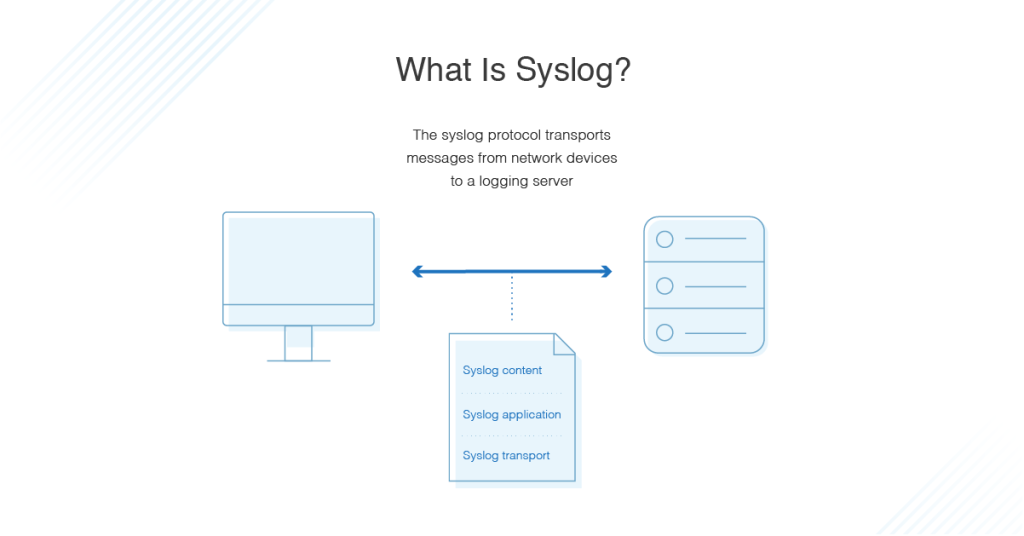
The syslog protocol is a standardized logging protocol used to collect, store, and transmit event messages from network devices, servers, applications, and security appliances to a centralized logging server. It enables IT administrators to monitor network activity, troubleshoot issues, detect security threats, and maintain compliance by consolidating logs from multiple systems.
Originally developed for Unix systems, syslog has become the de facto standard for logging across diverse operating systems and network devices, including routers, switches, firewalls, Linux servers, Windows systems (through agents), and cloud infrastructure.
Today, organizations of all sizes rely on syslog to gain visibility into system events and improve operational efficiency.
How the Syslog Protocol Works
The syslog protocol follows a client-server architecture.
- A device generates an event.
- The event is formatted as a syslog message.
- The message is transmitted to a syslog server.
- The server stores, analyzes, indexes, or forwards the log.
- Administrators use monitoring tools to search and analyze the collected logs.
+------------+
| Router     |
+------------+
      |
+------------+
| Firewall   |
+------------+
      |
+------------+
| Linux Host |
+------------+
      |
      | Syslog Messages
      |
      v
+--------------------+
| Syslog Server      |
| Log Collection     |
| Storage            |
| Analysis           |
+--------------------+
      |
      v
+--------------------+
| SIEM Dashboard     |
+--------------------+
This centralized architecture simplifies monitoring across hundreds or even thousands of devices.
Components of the Syslog Protocol
1. Syslog Client
A syslog client is any device or application that generates log messages.
Examples include:
- Routers
- Switches
- Firewalls
- Linux servers
- Web servers
- Database servers
- Security appliances
- IoT devices
2. Syslog Server
The syslog server receives, stores, and processes log messages from multiple clients.
Modern syslog servers often provide:
- Log indexing
- Searching
- Alerting
- Dashboard visualization
- Compliance reporting
- Long-term storage
3. Log Messages
Every event generated by a device is converted into a standardized syslog message before transmission.
These messages contain information such as:
- Timestamp
- Hostname
- Application name
- Process ID
- Event severity
- Event description
Syslog Facilities
Facilities identify which subsystem generated the message.
Common facilities include:
| Facility | Description |
|---|---|
| Kernel | Operating system kernel |
| User | User-level applications |
| Mail server | |
| Daemon | Background services |
| Auth | Authentication services |
| Syslog | Syslog process |
| Local0–Local7 | Custom applications |
Syslog Severity Levels
Severity indicates how important an event is.
| Level | Name | Description |
|---|---|---|
| 0 | Emergency | System unusable |
| 1 | Alert | Immediate action required |
| 2 | Critical | Critical condition |
| 3 | Error | Error condition |
| 4 | Warning | Warning message |
| 5 | Notice | Normal but significant |
| 6 | Informational | Informational event |
| 7 | Debug | Debugging information |
Lower numbers represent more severe events.
Syslog Transport Protocols
The syslog protocol supports multiple transport methods.
UDP (Port 514)
UDP is the traditional transport protocol.
Advantages:
- Fast
- Lightweight
- Low overhead
Disadvantages:
- No delivery guarantee
- Possible packet loss
TCP (Port 514)
TCP improves reliability by ensuring message delivery.
Benefits include:
- Ordered delivery
- Error checking
- Reduced packet loss
TLS (Port 6514)
For secure logging, syslog supports Transport Layer Security (TLS).
Benefits include:
- Encryption
- Authentication
- Data integrity
- Compliance with security regulations
TLS is recommended for transmitting logs across untrusted networks.
Syslog Protocol Architecture
+-------------+
| Applications|
+-------------+
        |
+-------------+
| Syslog API  |
+-------------+
        |
+-------------+
| Syslog Daemon|
+-------------+
        |
   UDP/TCP/TLS
        |
+----------------+
| Syslog Server  |
+----------------+
        |
+----------------+
| SIEM Platform  |
+----------------+
Advantages of the Syslog Protocol
Centralized Logging
Administrators can monitor all devices from one location.
Simplified Troubleshooting
Historical logs help identify failures quickly.
Improved Security Monitoring
Security teams can detect:
- Failed login attempts
- Unauthorized access
- Malware activity
- Firewall events
- Configuration changes
Vendor Compatibility
Almost every networking vendor supports syslog.
Examples include:
- Cisco
- Juniper
- Fortinet
- Palo Alto Networks
- MikroTik
- VMware
- Linux distributions
Automation
Syslog integrates with automation platforms that can trigger alerts or remediation actions when specific events occur.
Regulatory Compliance
Centralized log collection supports standards such as:
- PCI DSS
- HIPAA
- ISO 27001
- SOC 2
Limitations of the Syslog Protocol
Despite its popularity, syslog has several limitations.
- UDP Reliability – Traditional syslog over UDP may lose packets during network congestion.
- Lack of Encryption – Classic syslog transmits data in plaintext. Without TLS, attackers may intercept sensitive log information.
- Inconsistent Log Formats – Different vendors often generate logs using proprietary message structures.
- Large Log Volumes – High-volume environments may generate millions of log entries daily, requiring scalable storage and efficient indexing.
Syslog vs SNMP
| Feature | Syslog | SNMP |
|---|---|---|
| Primary Purpose | Event logging | Network monitoring |
| Communication | One-way logging | Polling and traps |
| Stores Historical Data | Yes | Limited |
| Event Details | Extensive | Basic |
| Performance Monitoring | Limited | Excellent |
| Security Monitoring | Excellent | Moderate |
The two protocols are complementary rather than competing technologies. Many organizations use SNMP for performance monitoring and syslog for event logging and security analysis.
Common Use Cases
Organizations use the syslog protocol for many operational and security tasks.
Network Monitoring
Routers and switches report interface changes, routing updates, and hardware failures.
Security Monitoring
Firewalls generate logs for:
- Blocked traffic
- VPN connections
- Intrusion attempts
- Access control violations
Server Administration
Linux servers log:
- User logins
- Service failures
- Kernel messages
- Software updates
SIEM Integration
Security Information and Event Management (SIEM) platforms ingest syslog data to correlate events, detect anomalies, and support incident response.
Compliance Auditing
Organizations retain syslog records to demonstrate compliance during audits and forensic investigations.
Best Practices for Using the Syslog Protocol
To maximize the effectiveness of syslog, consider these recommendations:
- Use TLS instead of UDP whenever possible.
- Synchronize device clocks using NTP for accurate timestamps.
- Configure severity-based filtering to reduce unnecessary logs.
- Store logs redundantly to prevent data loss.
- Rotate and archive logs regularly.
- Monitor disk usage on syslog servers.
- Implement role-based access control for log management.
- Integrate syslog with SIEM platforms for advanced analytics.
- Define retention policies that align with business and regulatory requirements.
- Regularly review and tune alert thresholds to minimize false positives.
Conclusion
The syslog protocol is a foundational technology for centralized logging, network monitoring, and security operations. By collecting event data from servers, network devices, applications, and security appliances into a single location, syslog helps organizations troubleshoot issues faster, detect threats more effectively, and meet regulatory compliance requirements.
Although traditional syslog over UDP has limitations in reliability and security, modern implementations using TCP and TLS provide dependable and encrypted log transport. When combined with log management platforms or SIEM solutions, syslog becomes an essential component of a robust IT operations and cybersecurity strategy.