Reverse Address Resolution Protocol (RARP): How It Works and Why DHCP Replaced It
The Reverse Address Resolution Protocol (RARP) was an early network bootstrapping protocol. It allowed a device that knew its hardware address—usually an Ethernet MAC address—but did not know its IP address to ask a server for that missing IP address. RARP mattered most in the era of diskless workstations. At startup, these machines needed an IP address before they could use IP networking or download the software needed to boot. Today, RARP is largely a historical protocol: DHCP provides the same basic address-assignment capability plus substantially more configuration and flexibility. This guide explains what RARP does, how it works, how it differs from ARP, and why modern networks use DHCP instead.
What Is the Reverse Address Resolution Protocol?
The Reverse Address Resolution Protocol is defined in RFC 903, published in 1984. Its central function is straightforward:
Given a known hardware (MAC) address, find the associated protocol (IP) address.
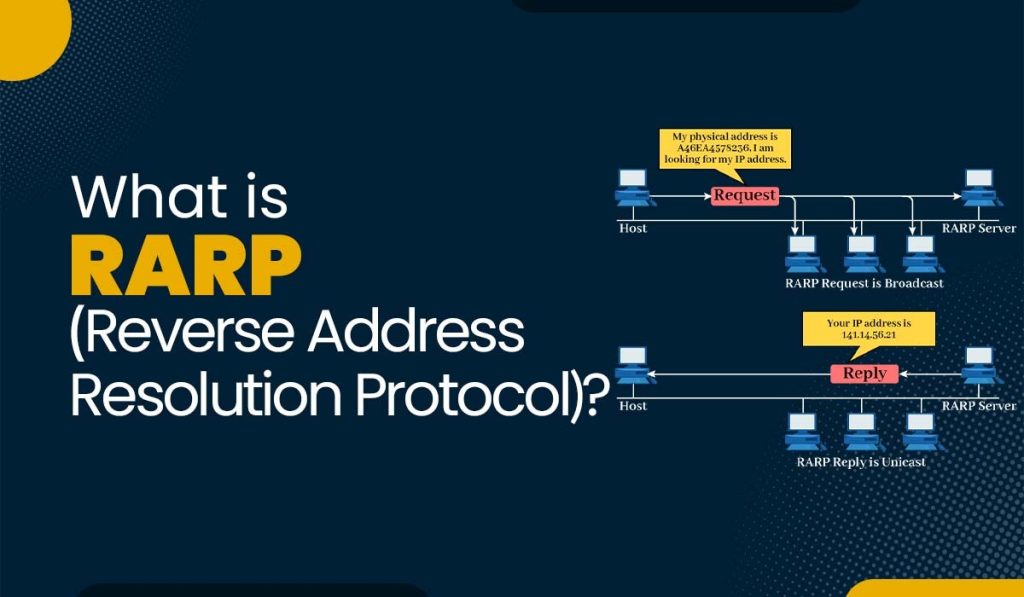
In an Ethernet/IP environment, a RARP client broadcasts a request containing its MAC address. A RARP server looks up that MAC address in its mapping database and returns the corresponding IPv4 address.
RARP is the conceptual opposite of ARP:
| Protocol | Starting information | Result |
|---|---|---|
| ARP (Address Resolution Protocol) | IP address | MAC address |
| RARP (Reverse Address Resolution Protocol) | MAC address | IP address |
Although their names are similar, ARP and RARP solve different problems. ARP helps a device deliver local Ethernet frames to a known IP destination. RARP helps an unconfigured device learn its own IP address during startup.
Why RARP Was Created
Early diskless workstations often had no local disk or persistent storage for network settings. After powering on, a workstation knows the MAC address of its network interface but might not know its IPv4 address. It could not communicate normally over IP until it obtained one.
RARP provided a small, purpose-built solution:
- The client starts with its MAC address.
- It broadcasts a RARP request on the local Ethernet network.
- A RARP server checks a preconfigured table of MAC-to-IP mappings.
- The server returns the IP address assigned to that client.
- The client can begin IP-based communication and proceed with its boot process.
The model depends on one or more RARP servers maintaining a reliable database of hardware-address-to-IP-address mappings. Unlike ARP, RARP has distinct client and server roles.
How Reverse Address Resolution Protocol Works
RARP operates at the data-link layer rather than as an IP/UDP application protocol. On Ethernet, it uses EtherType 0x8035, which identifies a frame as RARP. The protocol uses the same general packet structure as ARP, but uses different operation codes:
- 3 — RARP request (“request reverse”)
- 4 — RARP reply (“reply reverse”)
RARP Request and Reply Flow
RARP client                                      RARP server
    |                                                  |
    |-- Broadcast: “My MAC is 00:11:22:33:44:55;       |
    |              what is my IP address?” ---------->|
    |                                                  | Lookup MAC address
    |<-- Reply: “00:11:22:33:44:55 maps to             |
    |           192.0.2.25” --------------------------|
    |                                                  |
In a RARP request, the client’s MAC address appears as both the sender hardware address and the target hardware address. The IP address fields are not yet known. In the reply, the server places the client’s assigned IP address in the target protocol address field.
If no server replies, the RARP specification does not define a dedicated “not found” error response. The client simply waits for a reasonable period and may retry.
A Practical RARP Example
Imagine a diskless workstation with this MAC address:
00:11:22:33:44:55At boot, it broadcasts a RARP request. The RARP server has a static entry such as:
00:11:22:33:44:55 → 192.0.2.25The server returns 192.0.2.25, allowing the workstation to configure its IP stack. The device would still need other information—such as a subnet mask, default gateway, DNS servers, and possibly a boot file—to operate fully. That narrow scope is one reason RARP was eventually replaced.
Reverse Address Resolution Protocol Limitations
- It works only on the local network segment – RARP uses link-layer broadcasts. Routers do not normally forward those broadcasts, so a RARP server generally had to be available on the same Layer 2 segment as the client. This made centralized administration across multiple networks difficult.
- It provides only an IP address – RARP returns an address mapping; it does not provide the full configuration a host usually needs. It has no standard way to deliver a subnet mask, default gateway, DNS resolver, domain search suffix, lease duration, or boot-file details.
- It requires static MAC-to-IP mappings – Administrators had to maintain a mapping database for every RARP client. This was workable for a small, stable fleet of diskless machines, but laborious and error-prone as networks grew.
- It depends on raw link-layer handling – Because RARP sits below IP, server implementations need access to raw data-link frames. The BOOTP specification explicitly identifies this as a disadvantage compared with an IP/UDP-based bootstrap protocol.
- It has no defined authentication mechanism – RFC 903 does not specify authentication for RARP requests or replies. On a network where an attacker can inject link-layer traffic, the protocol alone offers no way for a client to verify that a reply came from an authorized RARP server.
RARP vs. BOOTP vs. DHCP
RARP was followed by BOOTP and then DHCP. Each newer protocol expanded what a newly connected or booting host could learn.
| Capability | RARP | BOOTP | DHCP |
| Provides an IPv4 address | Yes | Yes | Yes |
| Sends configuration over IP/UDP | No | Yes | Yes |
| Can use relay agents across subnets | No | Yes | Yes |
| Supplies boot-server and boot-file information | No | Yes | Yes |
| Supplies network options such as a gateway and DNS | No | Extensible | Yes |
| Supports reusable, time-limited address leases | No | No | Yes |
BOOTP improved the bootstrap process by using IP and UDP, supplying a client address, server information, and a boot-file name. It could also work across gateways with relay support. DHCP, which is based on BOOTP, added dynamic allocation of reusable addresses and an extensible configuration system. As a result, DHCP became the standard choice for automated IPv4 host configuration.
Is Reverse Address Resolution Protocol Still Used Today?
RARP may appear in networking courses, legacy documentation, packet captures, or older Unix and Sun workstation environments. It is not the normal choice for modern network deployment.
For current IPv4 environments, use DHCP when devices need automatic addressing and configuration. DHCP can deliver a much fuller configuration set and can serve clients across subnets through relay agents. For IPv6, use the appropriate IPv6 mechanisms, typically SLAAC, DHCPv6, or both, depending on the network design.
Do not confuse RARP with reverse DNS. Reverse DNS maps an IP address to a domain name using PTR records. RARP maps a link-layer hardware address to an IP address during host startup; the two technologies serve entirely different purposes.
Key Takeaway
The Reverse Address Resolution Protocol was a foundational bootstrapping mechanism for devices that knew their MAC address but not their IP address. Its simple MAC-to-IP lookup was useful for diskless workstations, yet it could not meet the configuration and scalability needs of modern networks. BOOTP and, ultimately, DHCP replaced RARP by delivering richer configuration and support beyond a single local network segment.